Server Detail Page
The Server Detail page (URL: /ui/servers/<name>) is where you inspect and
edit a single upstream server. It opens from the Servers list or via the
macOS tray's per-server submenu.
The page has four tabs: Tools, Logs, Configuration, and Security. This page covers the Configuration tab — for the others, see the Dashboard and Activity Log pages.
Configuration tab
The Configuration tab is a read-and-edit view of the server's
mcp_config.json entry. It uses dedicated cards for each block —
General, Connection, Headers, Environment Variables, Docker Isolation,
Status, Health.
This page focuses on the two cards introduced with the per-key editing feature: Headers (HTTP / streamable-http servers) and Environment Variables (stdio servers). They share an identical visual language and the same set of affordances.
Headers card

Each header row shows:
| Column | What it is |
|---|---|
| Key | The header name (e.g. Authorization) |
| Value | Either a masked literal (••••<last2> (<N> chars)), a ${keyring:NAME} chip, or a ${env:VAR} chip |
| Actions | 🔒 Convert to secret · ✎ Edit · ✕ Delete (variable set per row type) |
Value formats
- Masked literal —
••••59 (71 chars)— what you see for sensitive headers (Authorization, X-API-Key, Cookie, etc.) whenreveal_secret_headersis off (the default). The full secret is stored inmcp_config.jsonon disk; the mask is only how the API presents it. ${keyring:NAME}chip — the value is a reference to an OS keyring entry. The chip shows the keyring name so you can find the underlying secret on the Secrets page.${env:VAR}chip — similar, but resolved from the mcpproxy process's environment.- Plain string — non-sensitive headers (e.g.
X-Trace: on) show their literal value.
Add a header
Click + Add header at the top right of the card. Two inputs appear
(name + value). Hit Enter or click Add to commit. The new header is
upserted via a JSON Merge Patch and the row appears immediately.
Edit a header
Click the pencil icon next to a row. The value cell turns into a text input. Save (or Cancel) the change. The PATCH only sends this one key, so every other header stays exactly as it was — including the real plaintext behind any masked rows.
Delete a header
Click the ✕ icon and confirm. The header is deleted with a JSON Merge
Patch that sets the key to null:
PATCH /api/v1/servers/synapbus
Content-Type: application/json

{"headers": {"X-Stale": null}}
Other keys are preserved.
Convert a header value to an OS keyring secret
This is the safe way to take a Bearer token out of your config file. Click the 🔒 icon next to a literal value to open the modal:
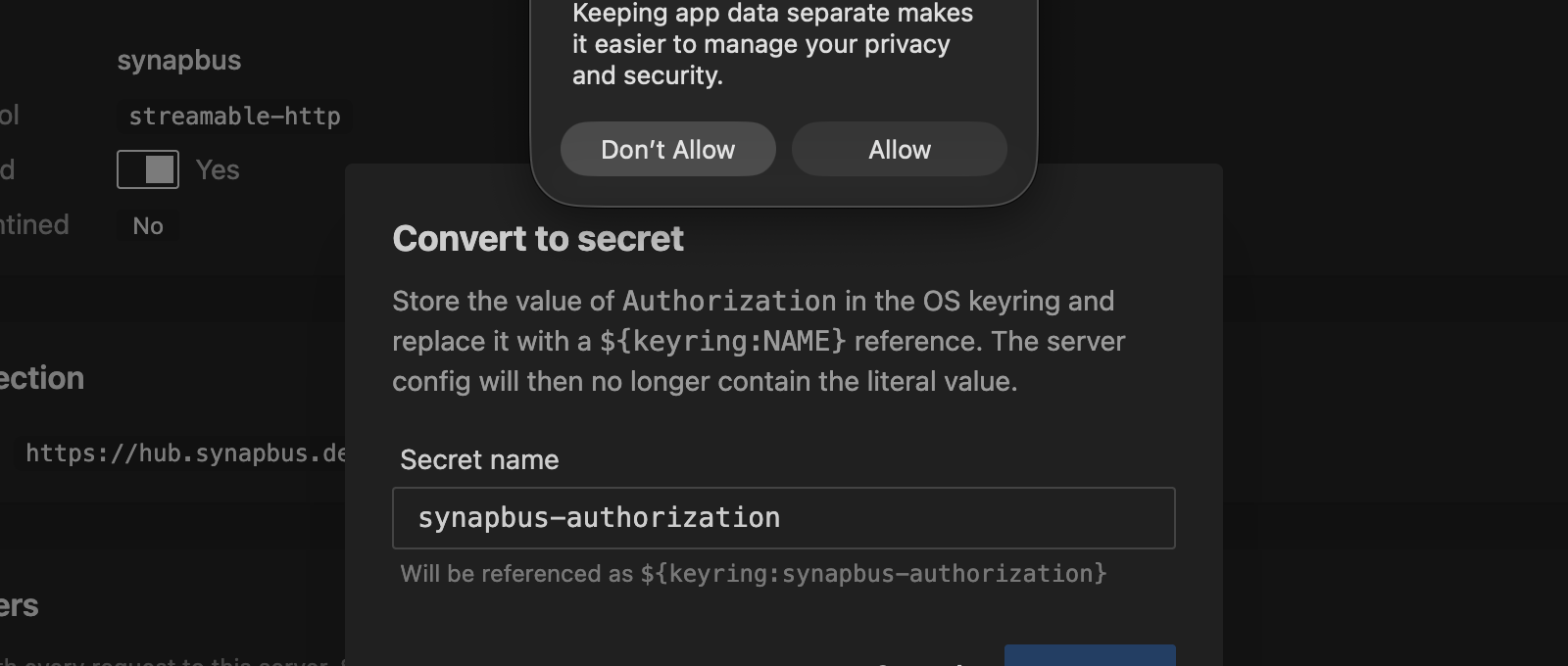
The modal asks for a secret name (pre-suggested as
<server>-<key>, all lowercase and hyphen-sanitised) and previews the
final reference. Hit Convert:
- The backend reads the real plaintext value from
mcp_config.json. - Stores it in the OS keyring under the name you chose.
- Rewrites the header field with
${keyring:<name>}.
All atomic — either the whole operation succeeds or nothing changes. The row immediately transforms from a masked literal into a keyring chip.
Why this matters: the Web UI never has to see or transmit the plaintext. The browser doesn't even need to be able to read the masked value — the backend has it. This is what makes the affordance work for sensitive headers the API redacts.
The same flow exists in the macOS tray's Edit dialog.
Environment Variables card
For stdio servers, the Environment Variables card behaves identically to Headers. Same row shape, same actions, same Convert-to-secret modal. Stdio env values aren't redacted on the wire today (only HTTP headers are) so masked rows are computed client-side, but the affordances are the same.
A common pattern is to start a stdio server with an OPENAI_API_KEY=<paste>
literal during onboarding, then click Convert to secret to move it into
keyring once you're sure the server works.
Behind the scenes
The Configuration tab is read-only against GET /api/v1/servers and
writes back via PATCH /api/v1/servers/{name}. Every per-row action is
a minimal JSON Merge Patch. The flow is documented in detail in the
REST API › PATCH section
and in Upstream Servers › Headers, Environment Variables, and Secrets.
The same operations are available from the CLI — see Management Commands › Patch Headers / Env — and from the macOS tray's Server Detail dialog.